
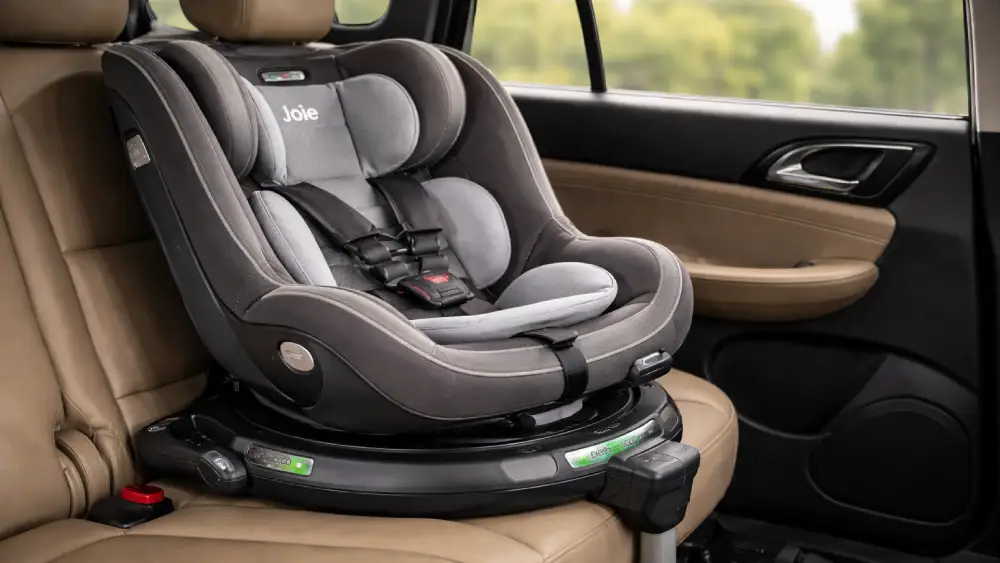
If you’re searching for how to install Joie 360 Spin car seat, chances are you’ve already unboxed it, admired the rotation feature, and then paused—because installation feels more serious than expected. I get it. A rotating car seat looks intuitive, but installing it correctly is where confidence really matters.
The Joie 360 Spin is designed to make daily life easier. Installation, however, demands attention to detail. Done right, it’s solid, safe, and incredibly convenient. Done wrong, it can wobble, refuse to rotate, or trigger those annoying red indicators.
In this guide, I’ll walk you through how to install Joie 360 Spin car seat step by step. Rear-facing. Forward-facing. ISOFIX. Support leg. Indicators. Troubleshooting. All of it—clearly and calmly.
Let’s get you from box to “securely installed” without stress.
Know Your Joie 360 Spin Model Before You Start
Before touching the seat, confirm which Joie 360 Spin model you have. This matters more than most people realize.
Popular versions include:
- Joie Spin 360
- Joie i-Spin 360
- Joie i-Spin 360 E
The core installation process is similar, but small details—like tether use or recline limits—can vary. Check the label on the seat or base, then glance at the manual for that exact model.
This small step prevents big confusion later.
Safety First: What to Check Before Installation
Installing a car seat is not something you rush. A few minutes of prep saves a lot of rework.
Before installing:
- Park on level ground
- Turn off the engine and set the parking brake
- Choose a seating position with ISOFIX anchor points
- Remove thick seat covers or protectors unless approved
- Make sure your child is not wearing bulky clothing
Also, decide upfront whether you’re installing rear-facing or forward-facing. That decision affects recline settings, support leg position, and rotation locks.
Understanding the Joie 360 Spin Installation System
To understand how to install Joie 360 Spin car seat, you need to understand what’s doing the real work.
The Joie 360 Spin relies on:
- ISOFIX connectors to anchor the base
- A support leg (load leg) to stabilize vertical movement
- A recline system that sets the seat angle
- Color indicators to confirm correct installation
Rotation is a convenience feature. It does not secure the seat. ISOFIX and the support leg do.
That distinction matters.
Rear-Facing Installation: Step-by-Step (ISOFIX)
Rear-facing is the starting point for most families—and where installation precision really counts.
Step 1: Set the Recline Position First
Before attaching anything, adjust the seat to the correct rear-facing recline position.
Why now?
Because once ISOFIX is locked, recline adjustment becomes harder.
Step 2: Extend the ISOFIX Connectors
Pull the ISOFIX connectors out from the base until they fully extend.
You want enough length to clearly reach your vehicle’s anchor points without forcing the seat.
Step 3: Attach ISOFIX to Vehicle Anchors
Line up the connectors with the ISOFIX anchors and push until you hear a solid click.
Check both sides.
Step 4: Confirm Green ISOFIX Indicators
Each connector has a red/green indicator.
- Red = not secure
- Green = locked correctly
No green? Don’t move on.
Step 5: Extend the Support Leg to the Floor
Lower the support leg until it firmly contacts the vehicle floor.
This step stabilizes the seat during a crash. It’s not optional.
Step 6: Confirm Support Leg Indicator Is Green
The leg has its own indicator. Adjust the height until it turns green.
If your vehicle has underfloor storage, check the manual. Some cars require a filler or specific adjustment.
Step 7: Final Stability and Rotation Check
Grip the seat at the base and give it a firm shake.
You’re looking for minimal movement. A little flex is normal. Wobble is not.
Now rotate the seat. It should turn smoothly and lock properly.
That’s the complete rear-facing process for how to install Joie 360 Spin car seat.
Forward-Facing Installation: Step-by-Step
Forward-facing installation builds on the rear-facing setup, but adds one key element: direction and, in some models, a top tether.
Step 1: Switch the Seat to Forward-Facing Mode
Rotate and lock the seat into the forward-facing position as instructed in your manual.
Some models require a specific release sequence.
Step 2: Adjust Recline for Forward-Facing
Forward-facing recline is usually more upright.
Set it now, before tightening anything further.
Step 3: Confirm ISOFIX Is Still Fully Locked
ISOFIX connectors stay attached from rear-facing to forward-facing.
Double-check both indicators are still green.
Step 4: Attach the Top Tether (If Required)
Some Joie 360 Spin models require a top tether when forward-facing.
Route it exactly as shown in the manual. No shortcuts.
Step 5: Tighten the Tether Correctly
Pull until snug, not aggressive.
Over-tightening can tilt the seat or interfere with rotation.
Step 6: Recheck All Indicators
ISOFIX. Support leg. Tether tension (if applicable).
Everything should show green or proper alignment.
Step 7: Final Movement Test
Push the seat forward and side-to-side at the base.
Less than an inch of movement is the goal.
Now you’ve completed how to install the Joie 360 Spin car seat in forward-facing mode.
Understanding the Indicator System (Don’t Ignore This)
Joie uses indicators for a reason. They remove guesswork.
Key Indicators to Watch
- ISOFIX connectors: red/green
- Support leg: red/green
- Rotation lock: audible click and alignment
Feeling tight is not the same as being correctly installed.
Trust the indicators.
Common Installation Mistakes (And How to Avoid Them)
I see these mistakes all the time—even from careful parents.
Avoid these:
- Installing without setting recline first
- Leaving the support leg slightly off the floor
- Assuming a “click” means locked without checking green
- Routing the top tether incorrectly
- Pushing the seat too tightly into the vehicle seatback
If something feels off, stop and reassess. Car seats reward patience.
Troubleshooting Installation Issues
Even when you follow the steps, things can go sideways.
Here’s how to fix the most common problems.
ISOFIX Won’t Connect
Usually a depth or alignment issue.
Try extending the connectors further and adjusting the seat angle.
Support Leg Won’t Reach the Floor
Check for underfloor storage compartments.
Some vehicles see the floor lower than expected.
Indicators Won’t Turn Green
This almost always means something is slightly misaligned.
Detach, reset, and try again. Small adjustments make a big difference.
Seat Wobbles After Install
Focus on the base, not the seat shell.
Wobble at the base means ISOFIX or the support leg needs adjustment.
Rotation Doesn’t Work
Rotation locks activate when the seat isn’t installed correctly.
Recheck indicators first. Rotation problems are usually installation problems.
Quick Installation Checklist
When you want a fast review, this helps.
Rear-Facing Checklist
- Recline set first
- ISOFIX both sides green
- Support leg green
- Seat rotates smoothly
- Minimal base movement
Forward-Facing Checklist
- Correct recline
- ISOFIX still green
- Top tether attached (if required)
- Support leg green
- Stable and secure
Final Thoughts: Confidence Comes From Correct Installation
Learning how to install Joie 360 Spin car seat isn’t about muscle or guesswork. It’s about sequence, indicators, and patience.
Once you’ve done it once, the process becomes straightforward. The rotation becomes effortless. Daily use feels smooth. And most importantly, you know your child is riding safely.
Take your time. Follow the steps. Trust the indicators.
You’ve got this!
Frequently Asked Questions
Most Joie 360 Spin models are ISOFIX-only, so seat belt installation is usually not supported.
Yes, the support leg is required and must rest firmly on the vehicle floor with a green indicator.
Always set the recline before attaching the ISOFIX connectors to make installation easier and more accurate.
This usually means the connectors aren’t fully engaged or the seat isn’t aligned properly with the anchors.
Yes, rotation works in both modes when the seat is installed correctly and locked in place.
Some Joie 360 Spin models require a top tether forward-facing, so always check your specific manual.
The base should move less than one inch side-to-side or front-to-back when checked at the base.
This depends on the model and vehicle; always follow the clearance guidance in the manual.
Rotation usually locks if one of the indicators isn’t green or the seat isn’t fully secured.
All ISOFIX and support leg indicators should be green, and the seat should feel stable and rotate smoothly.